

A DLP defect management system should help developers see five dashboard signals clearly: which defects are ageing, where work has stalled, where issues repeat, why items remain open and whether the backlog is improving.
Imagine a Monday project meeting. Management asks, “Which defects have been waiting the longest?” The project team checks a spreadsheet; Customer Care checks homeowner messages; someone asks the contractor.
That is why dashboard and reporting matter during VP handover and the Defect Liability Period (DLP). A report should show what needs attention today, who owns the next step and what is changing across the project.
1. Which defects are ageing?

“Outstanding” does not show whether a case arrived yesterday or has waited since the last meeting. Defect ageing means looking at days open and, where recorded, days in the current stage.
A useful dashboard brings older cases to the surface. Before a site briefing, the project manager can review submission date, status, responsibility and last update. A plumbing issue awaiting a part calls for a different action from an unassigned case.
For internal reporting, teams can group cases into age bands chosen for the project while keeping each item’s actual submission date visible.
ProFix helps teams track defect timelines, outstanding items and rectification progress. A DLP defect management system makes those records easier to review against the timeframe applicable to the development. Actual contractual obligations vary, and a dashboard cannot guarantee that physical rectification will finish by a particular date. It can help a team see which items need follow-up before more time passes.
2. At which stage is work getting stuck?
A large open count hides different problems. Some cases await assignment, others are with contractors, and some await the developer’s verification. One “in progress” number gives management little to act on.

A DLP defect management system should distinguish receipt, assignment, rectification, verification and closure. ProFix connects these VP & Defect Management steps so the project team can see who is responsible. Contractors update their work and upload photos; the developer’s team verifies the result before closure.
Separating “assigned,” “work updated,” “pending verification” and “closed” exposes the bottleneck. If cases age after contractors mark them complete, the next action may sit with the project team. If many remain unassigned, the team faces a different problem.
3. Where do the same issues keep appearing?
One defect submission may be an isolated repair. Similar reports across several units, a block or a particular location deserve a closer look. A dashboard can help the team review records by project, block, unit and defect category instead of treating every case as an unrelated line in a spreadsheet.
Repeated bathroom seepage reports may show where to inspect next. They do not prove the cause or identify who is at fault. Site inspection still matters; consistent records make the pattern visible.
Counts also need context. A block with more completed key collection appointments may naturally have more homeowner submissions. Management should consider handover volume and the age of cases before comparing one block with another. For a separate industry perspective on workmanship assessment, CIDB explains its independent QLASSIC framework; post-handover defect reporting provides the developer with operational evidence of its own.
4. Why are defects still open, and who owns the next action?
The oldest case on a dashboard is not always the one nobody cares about. Work may be waiting on materials, a replacement part or further inspection. Without a recorded reason, however, the project team has to ask the contractor again, Customer Care cannot give a clear update, and management sees only another overdue item.
In ProFix, a defect can be assigned to the relevant contractor with its unit, location, type, photo and required action. Contractors can record progress or explain why rectification cannot yet be completed. That gives the project team a way to distinguish items waiting for materials from items needing contractor attention or internal verification.

This is where defect management reporting becomes practical. Instead of sending a list of names and case counts, a project manager can discuss specific blockers and agree on the next action. Customer Care can also explain a pending status to the homeowner without repeating the same chain of calls. Clear remarks do not fix the defect, but they help everyone understand what is happening.
5. Can a DLP defect management system show backlog progress?
Management needs movement, not just a snapshot. At each meeting, review new submissions, verified closures, open cases and ageing items. If submissions outpace closures, the backlog may grow even when the team has been busy all week.

After VP handover and key collection, more owners begin inspecting their units. Read rising submissions alongside the number of units handed over. That context can help plan contractor capacity and Customer Care coverage.
ProFix captures updates as the work progresses, so reporting can draw on the same records used by the project team and contractors. Owners can see completed items individually rather than waiting for every submitted defect to be closed. The management report, meanwhile, can focus on the cases needing a decision: ageing items, repeated issues, unclear responsibility and delays with a known reason.
Turn a defect dashboard into a decision tool
A DLP defect management system is most useful when each report leads to an action. The project team sees which cases need assignment, inspection or verification. Customer Care sees what can be communicated clearly. Management sees where support or a process change may be needed.
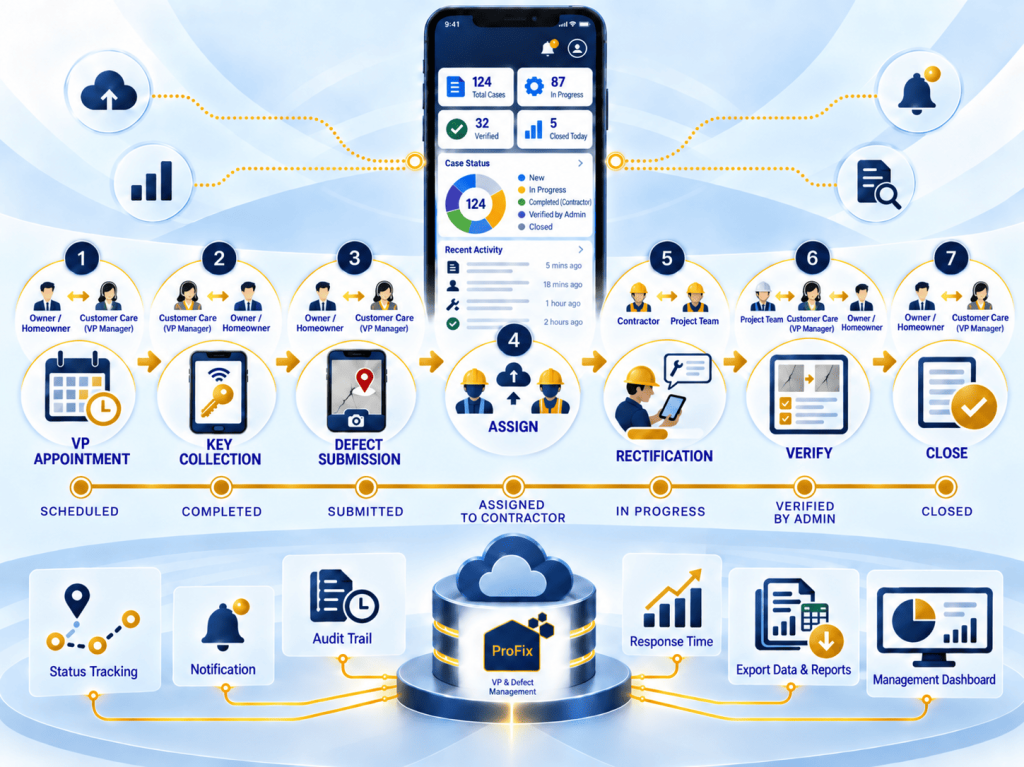
That is the purpose of ProFix’s connected VP & Defect Management journey: to bring defect submission, contractor updates, verification and closure into a shared view. The dashboard helps people find the right questions; the teams still make the decisions and carry out the work.
At your next reporting meeting, try asking: “Which defects are ageing, why are they waiting, and who will act next?” If the answer still requires several spreadsheets and calls, explore how ProFix supports VP and defect management or talk to our team about a project demo.